Create a key
Generate a personal API key in Profile. It uses your existing workspace role.
MCP · Claude Code · Codex · Cursor
Connect your coding agent to UltiPad and it can find the customer evidence, roadmap decision, and acceptance criteria behind the feature it is about to build.
you Ship the team onboarding flow we discussed.
→ ultipad.get_product_overview()
Objective found: Make every new team successful in week one
→ ultipad.search_ideas("team onboarding")
12 matching signals · 2 roadmap initiatives · acceptance criteria ready
→ ultipad.add_user_story()
Context linked. I’ll update the product record when the work ships.
Quick connect
Create a key once, use the client you already work in, and your agent gets the whole product loop as structured tools.
Your key is shown once and stored hashed. Reviewer keys are read-only.
claude mcp add --transport http ultipad https://ultipad.vercel.app/api/mcp --header "Authorization: Bearer YOUR_API_KEY"
From a product decision to a working build
Generate a personal API key in Profile. It uses your existing workspace role.
One terminal command wires Claude Code. Cursor and other MCP clients use the JSON config below.
Your agent reads the roadmap before it writes code and keeps the product record current after.
Not a mock-up
The agent finished planning, then called the ultipad MCP to create five roadmap initiatives and verify them on the live roadmap. This is how UltiPad builds UltiPad.
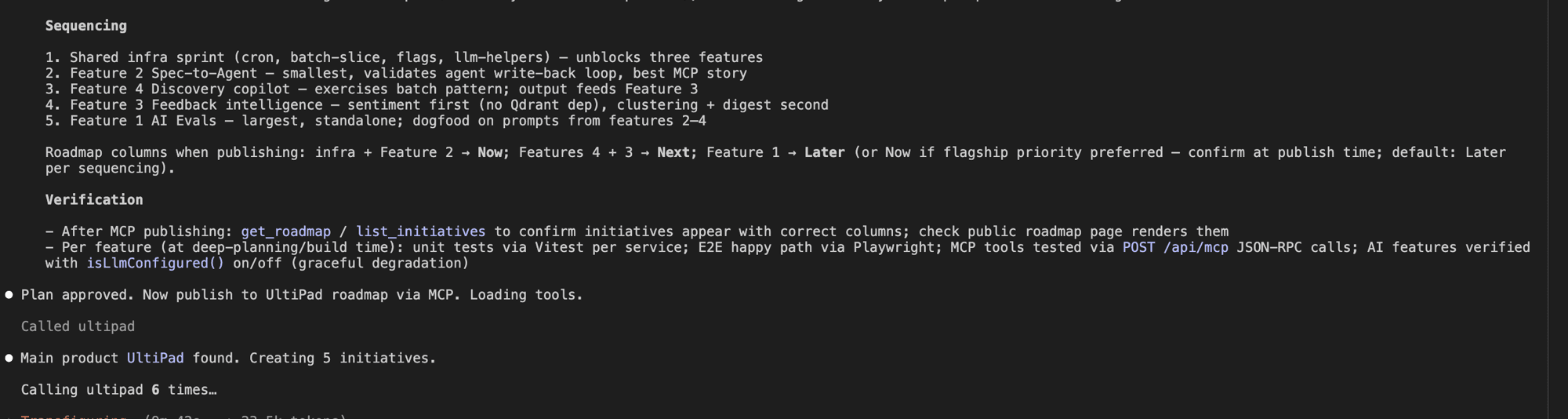
One terminal command and the 35 tools show up in your next session.
claude mcp add --transport http ultipad https://ultipad.vercel.app/api/mcp --header "Authorization: Bearer YOUR_API_KEY"
Add the server to your Claude Desktop MCP configuration file.
{
  "mcpServers": {
    "ultipad": {
      "type": "http",
      "url": "https://ultipad.vercel.app/api/mcp",
      "headers": {
        "Authorization": "Bearer YOUR_API_KEY"
      }
    }
  }
}Any streamable-HTTP MCP client works; the config shape is the same.
{
  "mcpServers": {
    "ultipad": {
      "type": "http",
      "url": "https://ultipad.vercel.app/api/mcp",
      "headers": {
        "Authorization": "Bearer YOUR_API_KEY"
      }
    }
  }
}It is plain JSON-RPC 2.0 over HTTP. Initialize, then call tools/list and tools/call.
curl -X POST https://ultipad.vercel.app/api/mcp \
  -H "Authorization: Bearer YOUR_API_KEY" \
  -H "Content-Type: application/json" \
-d '{"jsonrpc":"2.0","id":1,"method":"initialize","params":{}}'Everything an agent needs to read strategy and write progress back. Write tools require an editor or admin key; reviewer keys are read-only.
Paste this into your repo's CLAUDE.md (or your agent's rules file) and your assistant reads the roadmap before it builds, then writes shipped work back — including AI dev cost tracking per idea.
## UltiPad product sync (MCP: ultipad)

### One-time setup — resolve your product
list_products → pick the product for this repo. Record it here and reuse for every call:
  This repo → product: <NAME>, productId: <ID>

### GATE 1 — STOP before writing any code or editing any file
Do these steps first, every time:
1. search_ideas — find if an idea exists for this work.
2. If no match: create_idea(title, description, ideaType, productIds:[<ID>]). Note the ideaId.
3. report_dev_progress(ideaId, "started", agentModel, sessionId)
If idea has an approved spec: get_agent_spec(ideaId) and implement against it.

### GATE 2 — immediately after every git commit (before anything else)
```
git show --shortstat <sha>   # get additions/deletions/filesChanged
add_commit_ref(ideaId, sha, message, additions, deletions, filesChanged,
               agentModel="<your-model-id>", sessionId="<session-id>")
```
One call per commit. Do not batch. Do not defer.

### While building (ongoing)
- add_user_story(ideaId) — acceptance criteria as they firm up
- update_idea_details(ideaId, functionalSpecs/notes/targetOutcomes)
- update_idea_scores(ideaId, impact, effort, confidence) — scale: 0 1 2 3 5 8 13 20 40 100
- get_product_overview + get_roadmap — read strategy before major decisions

### GATE 3 — after shipping
report_dev_progress(ideaId, "completed", agentModel, sessionId)
set_idea_stage(ideaId, "Done")
update_idea_state(ideaId, "approved") if user approved the work.
Never write to another product's roadmap.
Make commit tracking deterministic: the git webhook (Settings → Configuration) links pushed commits that mention an idea number automatically — and this optional Claude Code hook reminds the agent after every local commit, so nothing depends on the model remembering.
// .claude/settings.json (in your repo) — deterministic reminder so the agent
// never forgets to record commits against UltiPad ideas.
{
  "hooks": {
    "PostToolUse": [
      {
        "matcher": "Bash",
        "hooks": [
          {
            "type": "command",
            "command": "jq -r '.tool_input.command // empty' | grep -q 'git commit' && echo 'REMINDER: record this commit on its UltiPad idea via the ultipad MCP add_commit_ref tool (sha + message + webUrl + additions/deletions from git show --shortstat).' || true"
          }
        ]
      }
    ]
  }
}
This actually happened
UltiPad idea #4 was specified, handed off, implemented, tracked, QA'd, and re-delivered by a coding agent over this MCP server \u2014 every comment, stage move, and commit below was written by the machine, inside UltiPad, with the PM only approving the spec and testing the result. That is ADLC: the agentic development lifecycle, live.
Approved the spec
Idea #4 “AI-powered idea scoring assistant”: AI drafted the spec from the idea, its feedback, and user stories; the PM edited and hit Approve for handoff.
get_agent_spec
Claude Code fetched the approved spec — stories with acceptance criteria, customer evidence, and the reporting contract.
report_dev_progress: started
Comment posted, idea auto-moved to In Progress — including a flagged spec deviation (RICE in the draft vs the product’s real Impact/Effort/Confidence model).
Implemented + add_commit_ref
✨ Suggest scores shipped per spec — per-dimension accept, nothing written without explicit action — and the commit landed on the idea’s Commits tab.
report_dev_progress: completed
Idea auto-moved to QA, spec status → delivered.
QA found a bug
Accepted scores didn’t refresh on screen. The agent fixed it, recorded the fix commit, and the loop correctly moved the idea back to In Progress — then re-delivered to QA.
One human step in the whole loop: dragging the idea to Done after testing it. Exactly where the human belongs.