Product context infrastructure for the agentic era
Your AI coding agents
need product context.
UltiPad connects customer evidence, product decisions, and acceptance criteria to Claude Code, Cursor, and Codex over MCP.
The loop
One customer signal, followed all the way to shipped.
Scroll it. Every screen below is the real UltiPad product — the same loop that built UltiPad.
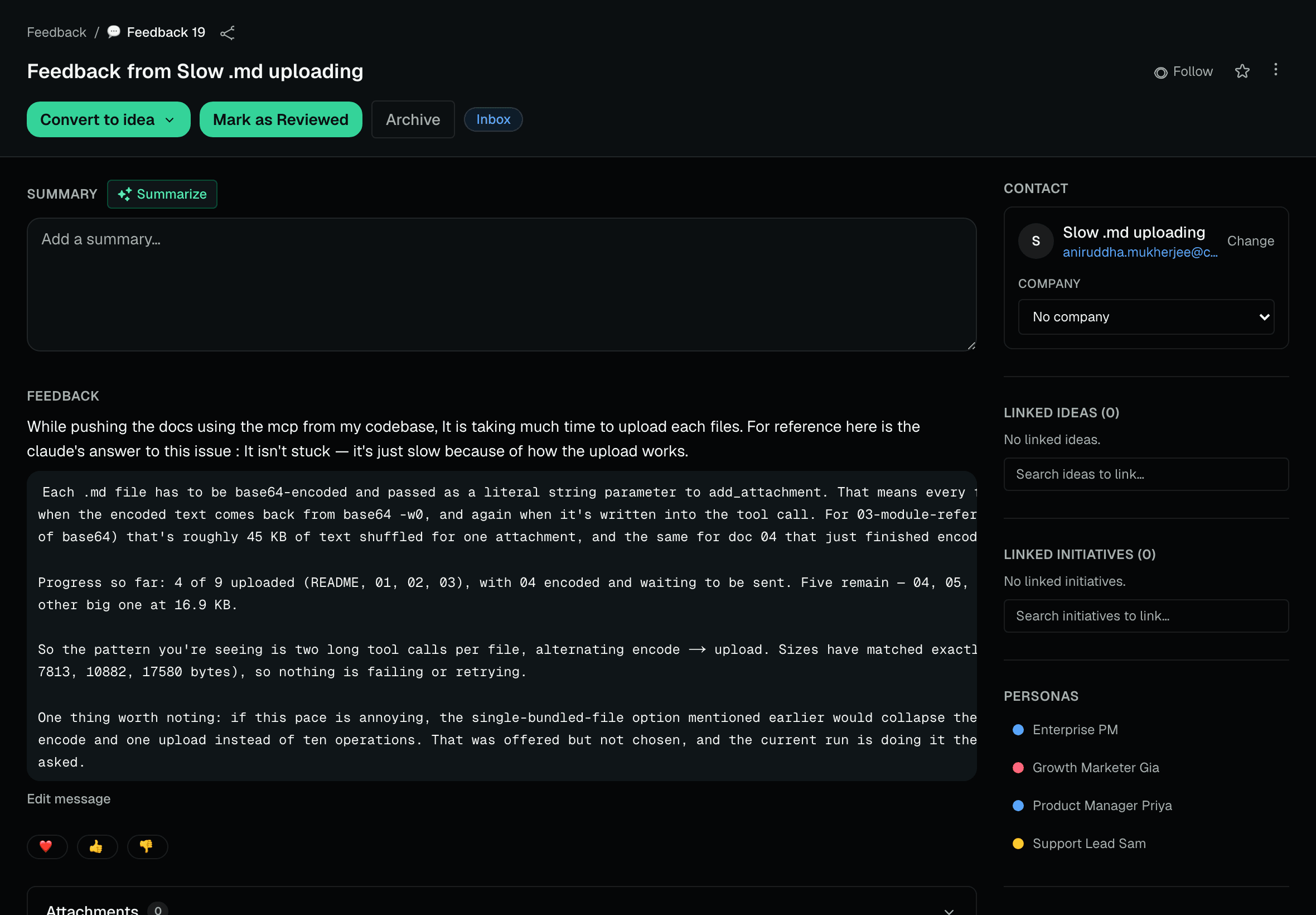
01 · Signal
A customer says something.
Feedback lands from portals, the app, or the REST API — captured with the contact, company value, personas, and the product decision it supports.
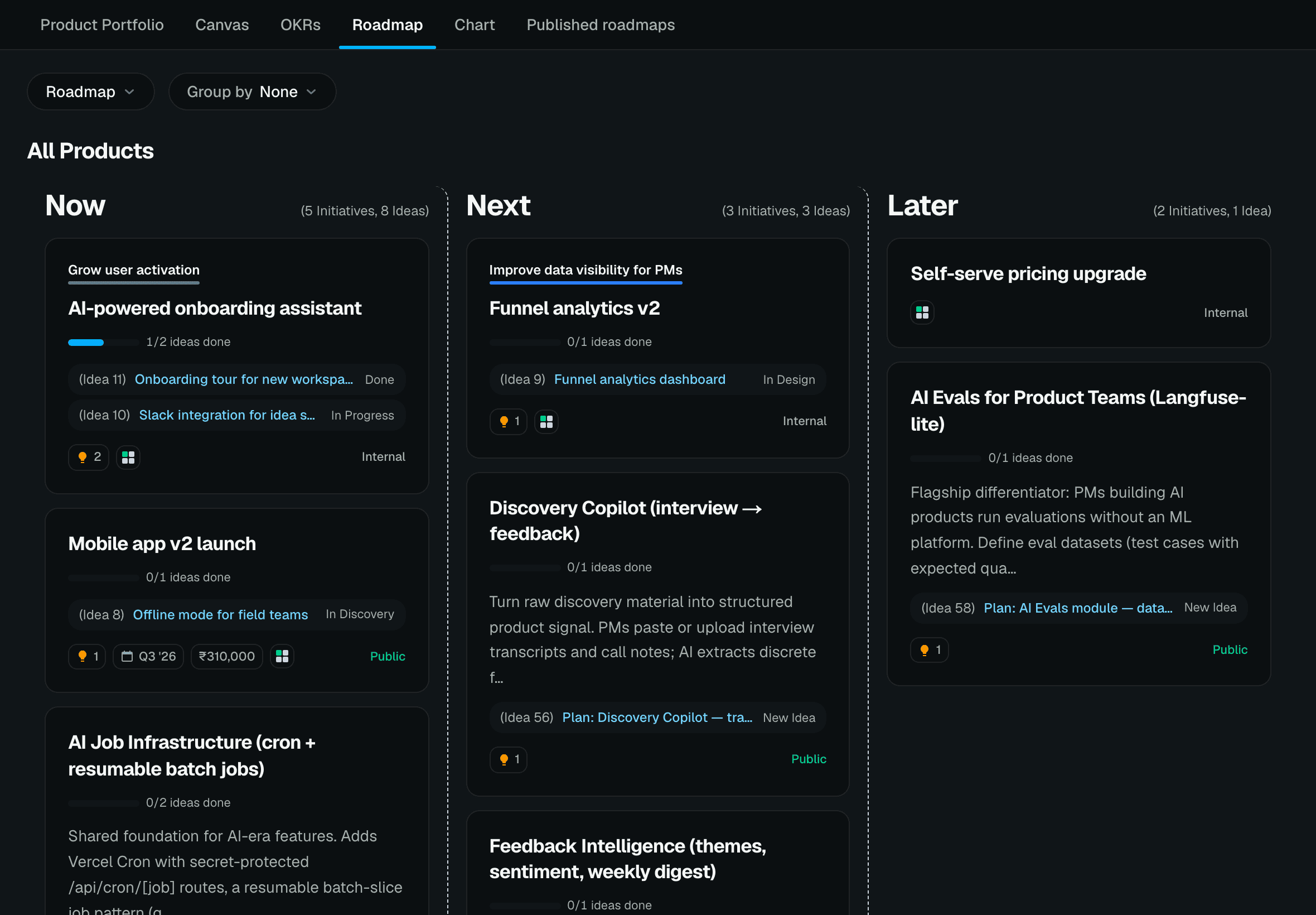
02 · Decision
UltiPad turns it into a decision.
Signals become scored ideas and a live Now / Next / Later roadmap tied to objectives — opinion becomes a priority that defends itself.
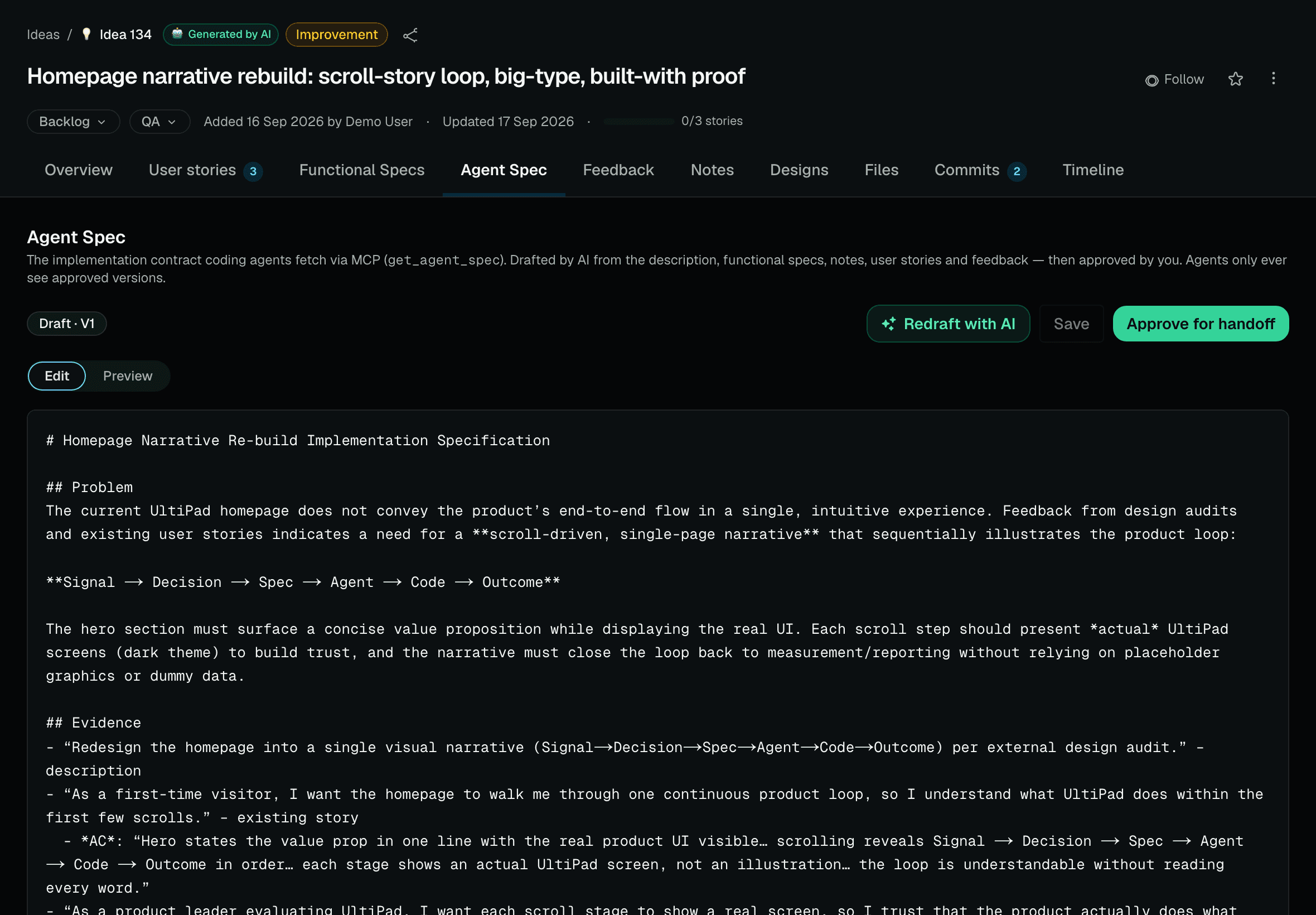
03 · Specification
The decision becomes a build contract.
User stories, acceptance criteria, and a human-approved agent spec — the exact contract a coding agent builds against, drafted in seconds.
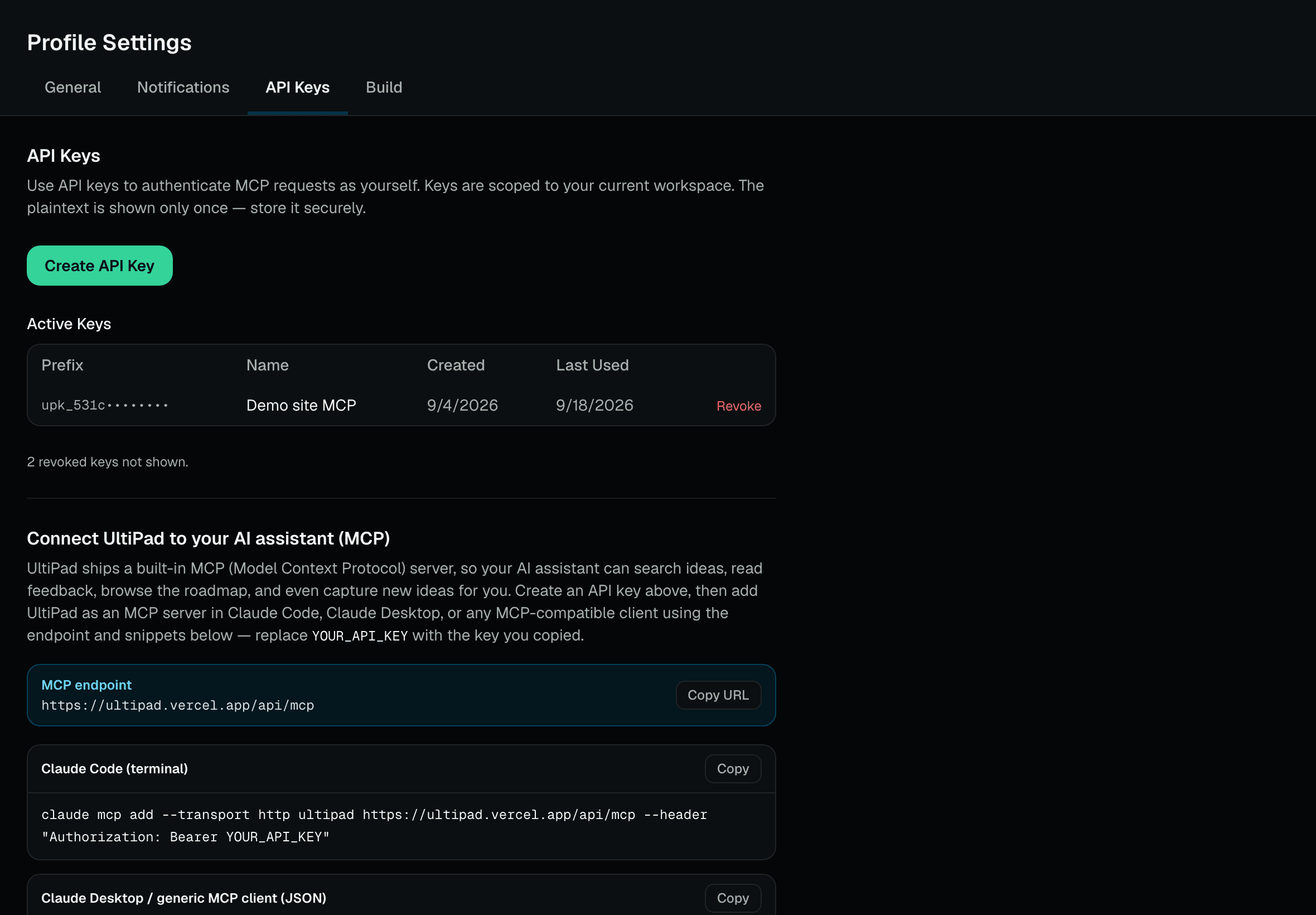
04 · MCP
The agent reads it over MCP.
One endpoint. Claude Code, Cursor, or Codex fetch the objective, the customer evidence, and the acceptance criteria before writing a single line.
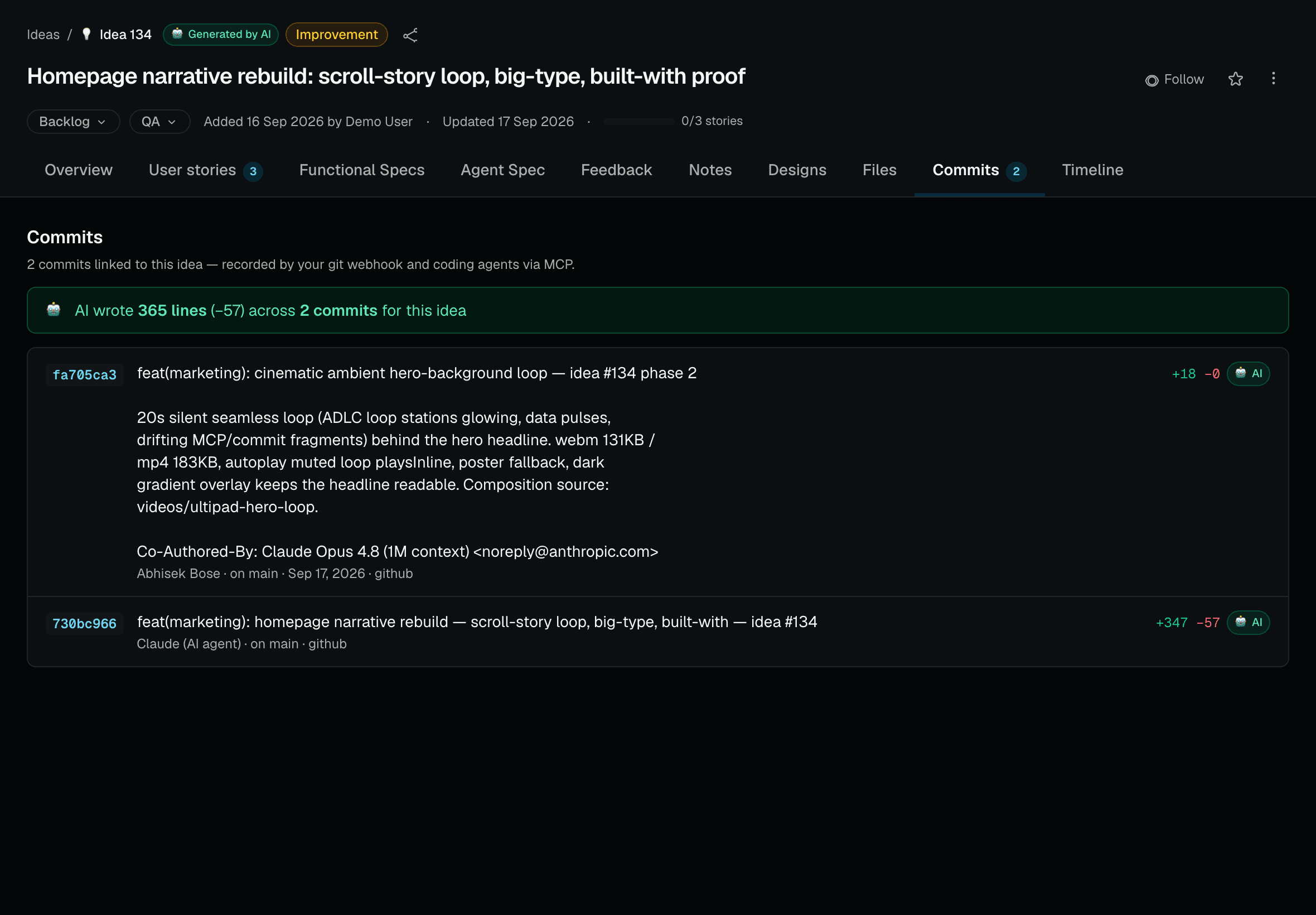
05 · Code
The agent writes the code.
Commits land back on the idea with diff stats and an AI stamp — “AI wrote 365 lines across 2 commits” — so contribution is measured, not guessed.
06 · Outcome
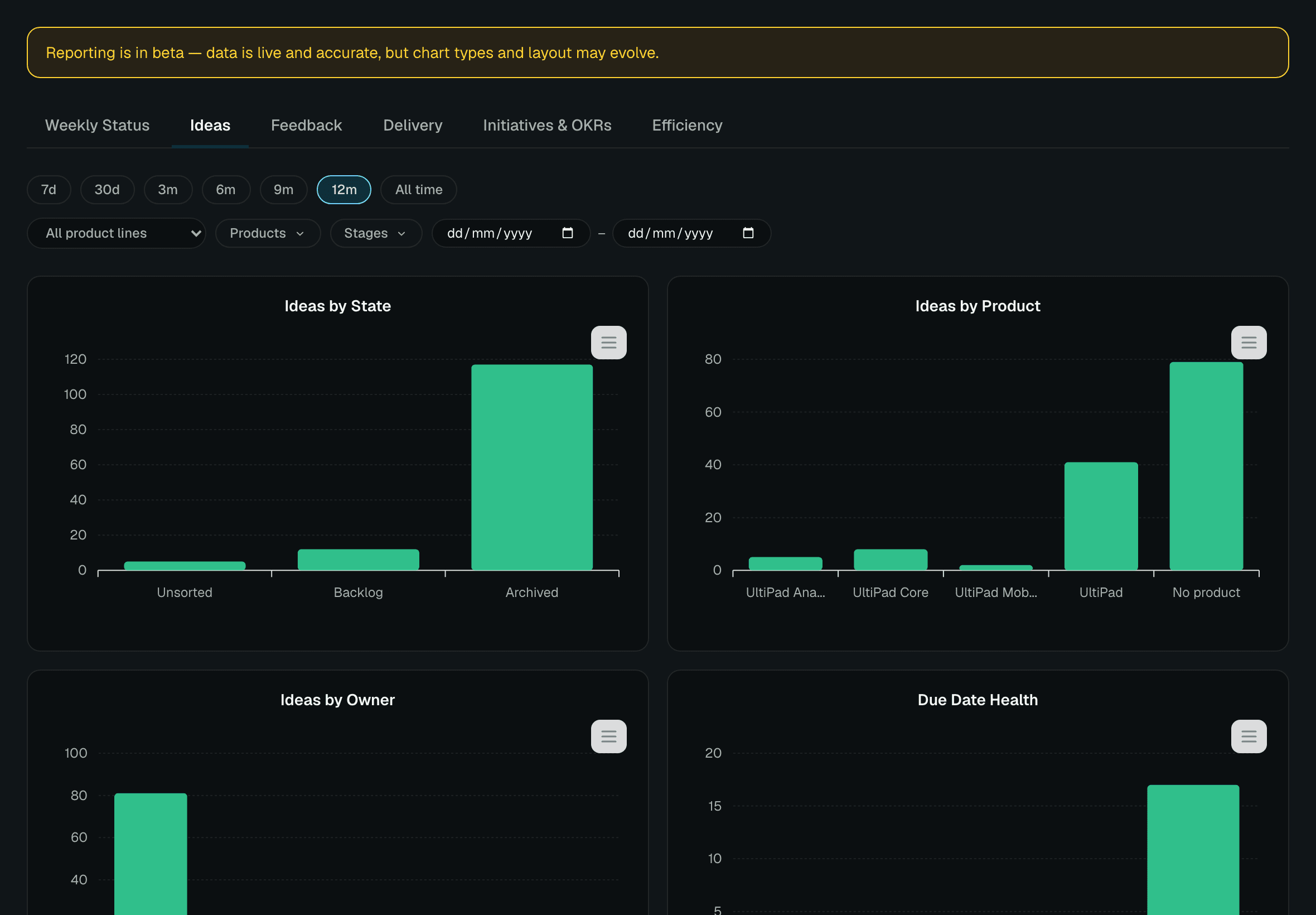
The result returns to the product system.
Delivery funnels, the AI-vs-human split, and lines shipped roll up into reporting. Then the next customer signal starts the loop again.
This is the product loop.
Customer evidence becomes a decision, a decision becomes a contract, an agent builds it, and the result comes back measured — then it starts again.
AI didn't break
software delivery.
It broke context.
UltiPad restores it — customer evidence, product decisions, roadmap, and acceptance criteria, connected straight to the agent that writes the code.
Works with your existing stack
Speaks MCP with your agents
UltiPad sits in front of the tools your team already runs — the decision layer, not another delivery tracker to migrate to.
Under a minute, end to end
Watch the loop run.
One customer signal, followed all the way to shipped code — scored, spec'd, built by an agent over MCP, and measured commit by commit. Every screen is the real product.
MCP built in
Your agent should understand the decision before it writes the code.
Give Claude Code, Codex, Cursor, or any MCP client the same context your best teammate has: the objective, customer signal, roadmap, and acceptance criteria.
Explore the MCP serveryou Build the new onboarding experience.
→ ultipad.get_product_overview()
Found objective: Make every new team successful in week one
→ ultipad.search_ideas("onboarding")
14 customer signals · 2 linked initiatives · existing acceptance criteria
→ ultipad.add_user_story()
Context loaded. I’ll build against the actual product decision — and update the story when it ships.
Bring your agent into the loop
One endpoint. Product context wherever you work.
--transport http https://ultipad.vercel.app/api/mcp
--header "Authorization: Bearer YOUR_API_KEY"
A workflow that stays current
Give strategy and delivery a shared memory.
When an agent ships work, it can link the story, update the idea, and preserve the trace back to customer evidence. Less status theatre. More compounding product knowledge.
See all MCP toolsProof, not promises
We built UltiPad with UltiPad.
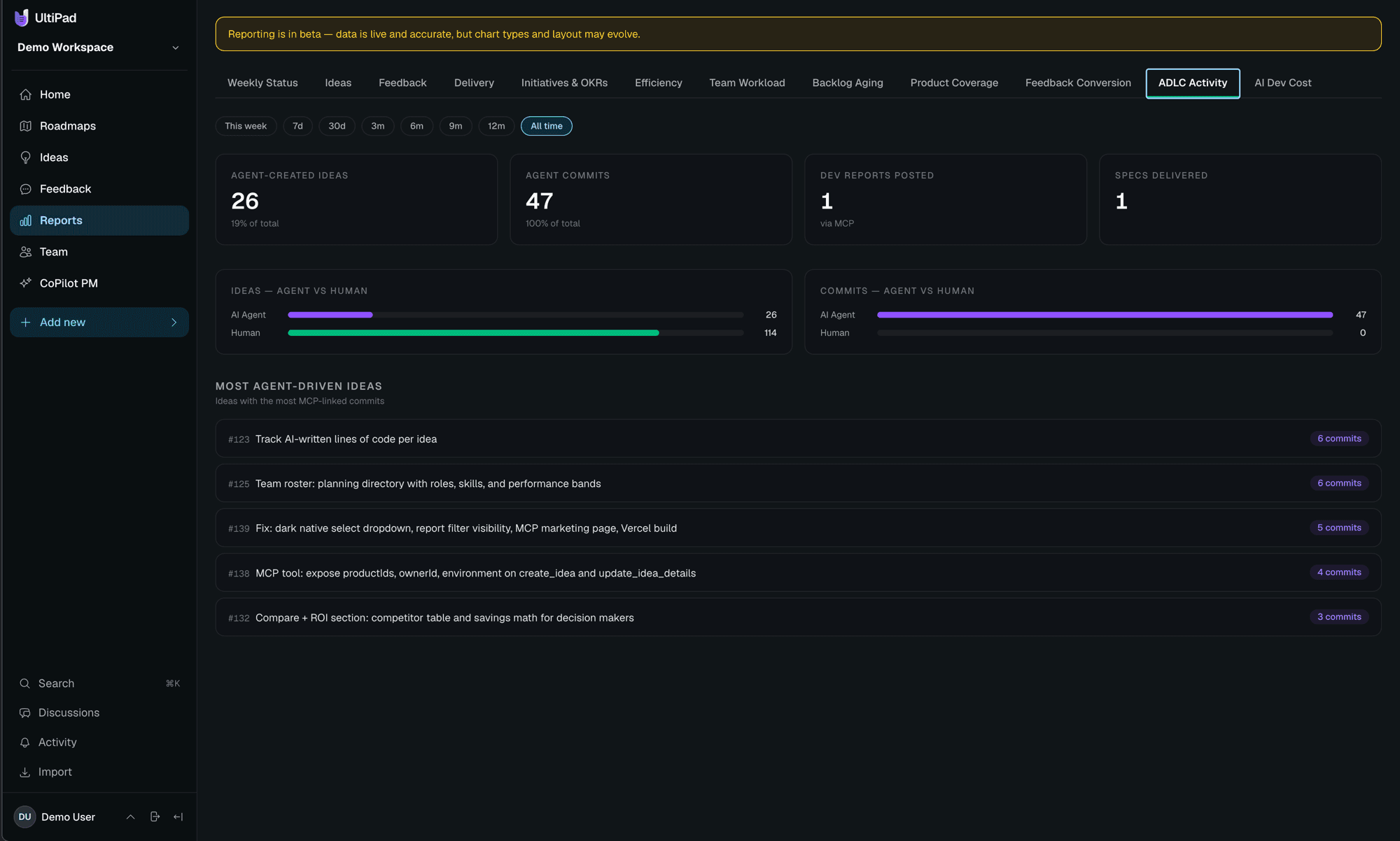
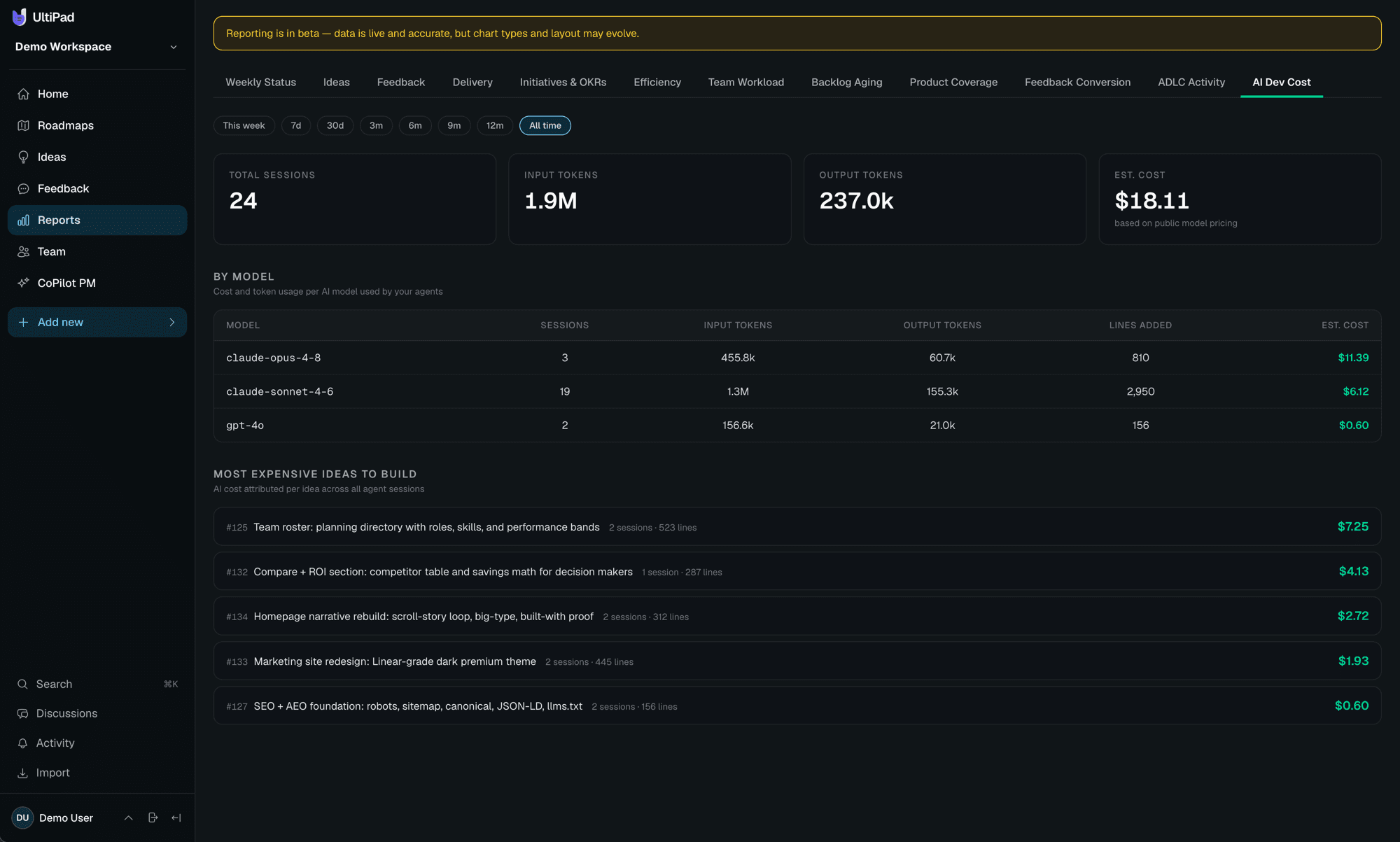
Most of this product was planned as ideas and implemented by a coding agent over MCP — every commit tracked on the idea it shipped.
30+
features shipped by the loop
3,028
AI-written lines, counted
35
MCP tools an agent can call
100%
of it traceable to an idea
Here's what that looks like
Why teams switch
The decision layer others don't have.
Great tools track delivery. UltiPad governs what gets built and why — and it's the only one built for teams where AI agents do real implementation work.
| Capability | UltiPad | Productboard | Jira | Linear |
|---|---|---|---|---|
| Customer feedback → idea evidence linking | ✓ | ✓ | ◐ | ◐ |
| Impact/effort/confidence prioritisation | ✓ | ✓ | ◐ | ◐ |
| Now/Next/Later roadmaps tied to OKRs | ✓ | ✓ | ◐ | ◐ |
| Auto-generated user stories + functional specsdrafted seconds after an idea is filed | ✓ | ◐ | ◐ | ◐ |
| Human-approved agent specs (build contracts) | ✓ | — | — | — |
| MCP server with product context + write-backagents read specs AND report progress, commits, stories | ✓ | — | ◐ | ◐ |
| AI code attribution — lines per idea, per commit | ✓ | — | — | — |
| Delivery scorecards + skill-will team matrix | ✓ | — | — | — |
| Client/stakeholder portals + published roadmaps | ✓ | ✓ | ◐ | — |
| Approximate pricing | Free during beta | ~$25+/maker/mo | ~$8–17/user/mo | ~$8–14/user/mo |
◐ = partial or via add-ons/plugins. Based on publicly documented capabilities and list pricing, September 2026. UltiPad complements delivery tools — most teams keep Jira or Linear and put UltiPad in front as the decision layer.
The maths for your CFO
Move the sliders. Watch the hours come back.
Start from your own team and hourly cost — the calculator applies the same conservative savings the loop delivers for us, live.
Your team
Assumptions per week: ~3h spec writing per PM, ~2.5h status overhead per team, ~2h context assembly per agent-using dev, ~2h reporting per lead. Deliberately conservative; excludes the biggest saving — not building the wrong feature.
What the loop returns
21h
per week, back
$5.3k
per month
$64k
per year
Against a tool that's free during beta — payback is immediate. At list pricing later, the first saved week typically covers the year.
The pitch to your leadership — with your numbers in it
“We're adopting AI coding agents, but they build blind — stale docs, tickets with no why. UltiPad gives them the approved spec, the customer evidence, and the roadmap over MCP, and every line they write comes back counted. For our team (2 PMs, 4 agent-using devs, 2 leads) that's roughly 21 hours a week back — about $5,330/month of reclaimed capacity at $60/hour — and it's free while in beta. The proof is public: UltiPad built itself this way, 3,000+ AI-written lines, tracked commit by commit.”
Questions, answered
What is UltiPad?
UltiPad is a product context platform for AI coding agents. It connects customer feedback, product decisions, roadmaps, and acceptance criteria to agents like Claude Code, Cursor, and Codex through MCP — and receives their progress, commits, and line counts back automatically. Teams use it to decide what to build, hand approved specs to agents, and measure exactly what shipped.
How does UltiPad work with Claude Code, Cursor, or Codex?
One command registers UltiPad as an MCP server in the client — for Claude Code: claude mcp add ultipad with your workspace endpoint and a per-user API key. From then on the agent can read product overviews, roadmaps, customer evidence, and approved agent specs before building, and write back progress reports, commit references with diff stats, comments, and even new ideas. Cursor, Codex, and Claude Desktop connect the same way.
How does customer feedback reach an AI coding agent?
Feedback arrives through portals, the app, or the REST API, and gets linked as evidence to the idea it supports. When that idea earns an approved agent spec, the spec carries the customer evidence with it — so the agent implementing the feature can read the actual request that motivated it over MCP, not a paraphrase from a ticket.
How is UltiPad different from Jira?
Jira tracks delivery: tickets, sprints, burndown. UltiPad manages the decisions before a ticket exists. Ideas get scored on impact and effort, backed by customer feedback, and promoted to a Now/Next/Later roadmap tied to OKRs. When something is ready to build, the user stories hand off cleanly. You can import an existing Jira backlog to start.
Does it replace our delivery tool?
No. UltiPad is the layer where you decide what to build and why. Ideas carry user stories with acceptance criteria, and those hand off to whatever your engineers already use — or straight to your coding agent over MCP. Delivery stays where it is.
What does the AI actually do?
Every new idea documents itself: user stories, acceptance criteria, and a functional spec draft within seconds — whether a human typed it or an agent filed it over MCP. Ideas earn a human-approved agent spec that coding agents build against, and progress reports itself back: commits linked, stories checked off, stages moved. On top of that, AI suggests scores and tags, clusters feedback into signals, summarizes uploads, and answers questions through the copilot. It suggests; you decide.
What is the MCP server?
A built-in Model Context Protocol endpoint with 35 tools, authenticated with per-user API keys. Coding assistants like Claude Code and Cursor read your product vision, roadmap, and approved specs before they build — then write back progress, commits, comments, and even new ideas as they ship. Reviewer keys are read-only. There is also a REST feedback API for support desks, forms, and Zapier.
Is there a free tier?
Yes — UltiPad is free while we onboard teams in waves. Join the waitlist and we'll open your workspace with your team invited. No credit card, ever, during the beta.
What is product context?
Product context is everything an engineer — or an AI coding agent — needs to build the right thing: the customer evidence behind a request, the decision that prioritised it, the roadmap it belongs to, and the acceptance criteria that define done. Project management tracks the work; product context explains it. UltiPad stores that context on every idea and serves it to agents over MCP.
How do you give an AI coding agent product context?
Connect the agent to UltiPad's MCP server with one command and a per-user API key. Before building, the agent calls tools like get_product_overview, get_roadmap, and get_agent_spec to read the objective, the customer evidence, and the human-approved acceptance criteria. After building, it reports back: commits with line counts, progress updates, and completed stories — all recorded on the idea it implemented.
How do you stop an agent from building the wrong feature?
Two mechanisms. First, agents build against approved agent specs — a human reviews the auto-drafted stories and spec before an agent can treat them as a contract. Second, everything an agent does is attributed: its ideas are badged AI-created, its comments carry an AI marker, and its commits are counted line by line, so drift is visible immediately rather than at the next release review.
Is UltiPad a Jira, Productboard, or Linear alternative?
UltiPad overlaps Productboard's territory (feedback, prioritisation, roadmaps) more than Jira's or Linear's (delivery tracking). The difference from all three is the agent layer: UltiPad is built for teams where AI coding agents do real implementation work — it hands them approved specs over MCP and receives their progress, commits, and line counts back. Most teams keep their delivery tool and put UltiPad in front of it as the decision layer.
What is the ADLC — the Agent Development Life Cycle?
The ADLC is the software lifecycle redrawn for teams that build with AI agents: idea → auto-generated documentation → human-approved agent spec → agent implementation over MCP → delivery evidence flowing back automatically (commits, line counts, stage changes) → measured outcomes. UltiPad is the first platform built around this loop, and it develops itself with it — 30+ features and 3,000+ AI-written lines so far.
Make AI build with context
Build the product your customers are already asking for.
Customer evidence, product decisions, specs, and shipped outcomes — one loop, connected to your agent. We're onboarding teams in waves.